Appearance
CRUD 组件
友情提示: CRUD 组件,比较适合开发简单的 CRUD 功能。如果是复杂的功能,使用起来会比较困难。所以一般情况下,我们还是建议使用 Element Plus 的原生组件。 管理后台的功能,一般就是 CRUD 增删改查,可以拆分 3 个部分:“列表”、“新增/修改”、“详情”,如下图所示:
| 部分 | 组件 | 示例 |
|---|---|---|
| 列表 | Search + Table | 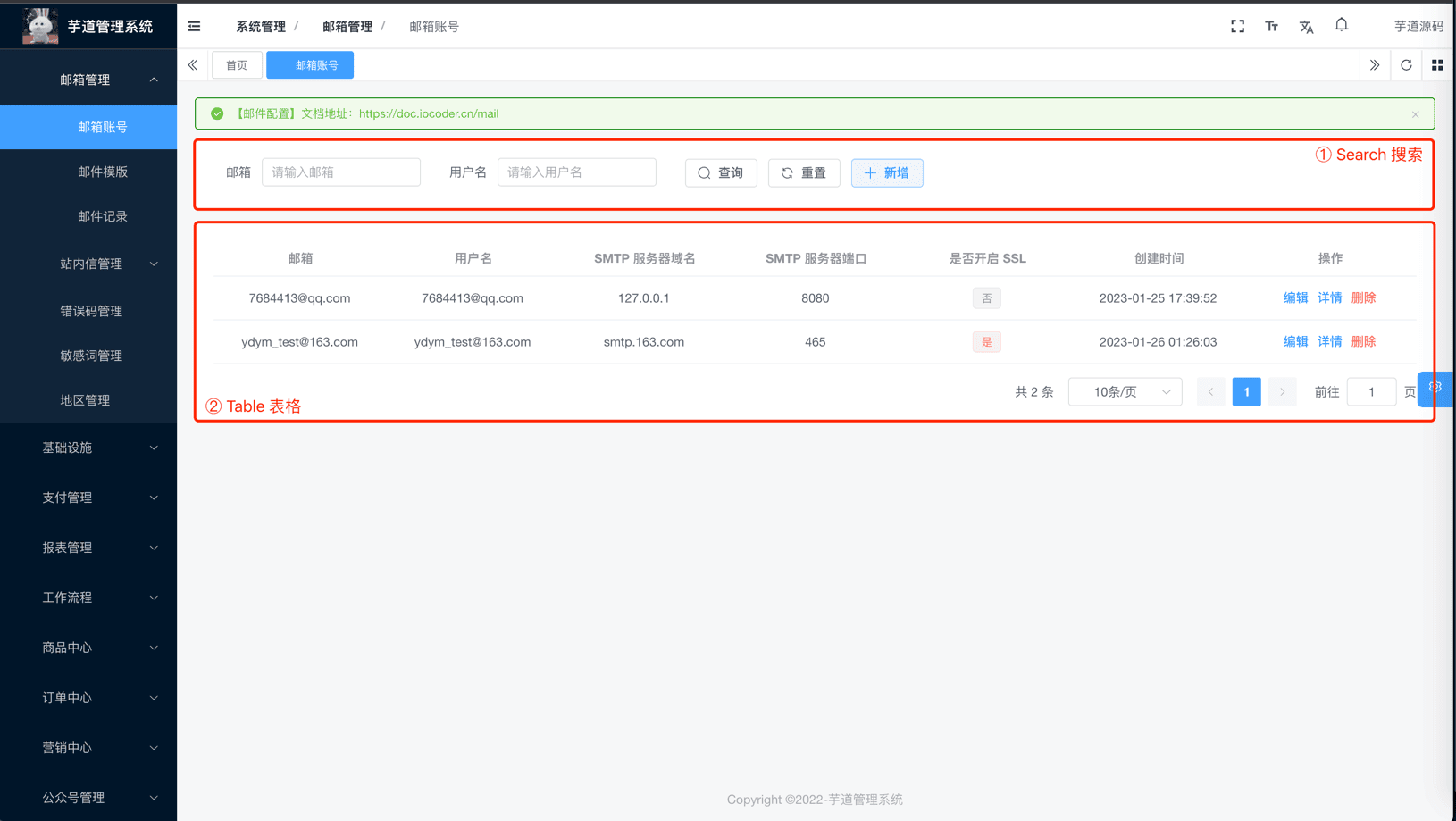 新增 / 修改 |
| Search | 查询组件 | |
| Table | 表格组件 | |
| Form | 表单组件 | |
| Descriptions | 描述组件 |
# 2. CRUD 组件
由于以上 4 个组件都需要 Schema 或者 columns 的字段,如果每个组件都写一遍的话,会造成大量重复代码,所以提供 useCrudSchemas 来进行统一的数据生成。 ① useCrudSchemas:位于 src/hooks/web/useCrudSchemas.ts 内 ② useCrudSchemas 可以理解成一个 JSON 配置,示例如下: useCrudSchemas 示例 import { CrudSchema, useCrudSchemas } from '@/hooks/web/useCrudSchemas' const crudSchemas = reactive([ { field: 'index', label: t('tableDemo.index'), type: 'index', form: { show: false }, detail: { show: false } }, { field: 'title', label: t('tableDemo.title'), search: { show: true }, form: { colProps: { span: 24 } }, detail: { span: 24 } }, { field: 'author', label: t('tableDemo.author') }, { field: 'display_time', label: t('tableDemo.displayTime'), form: { component: 'DatePicker', componentProps: { type: 'datetime', valueFormat: 'YYYY-MM-DD HH:mm:ss' } } }, { field: 'importance', label: t('tableDemo.importance'), formatter: (_: Recordable, __: TableColumn, cellValue: number) => { return h( ElTag, { type: cellValue === 1 ? 'success' : cellValue === 2 ? 'warning' : 'danger' }, () => cellValue === 1 ? t('tableDemo.important') : cellValue === 2 ? t('tableDemo.good') : t('tableDemo.commonly') ) }, form: { component: 'Select', componentProps: { options: [ { label: '重要', value: 3 }, { label: '良好', value: 2 }, { label: '一般', value: 1 } ] } } }, { field: 'pageviews', label: t('tableDemo.pageviews'), form: { component: 'InputNumber', value: 0 } }, { field: 'content', label: t('exampleDemo.content'), table: { show: false }, form: { component: 'Editor', colProps: { span: 24 } }, detail: { span: 24 } }, { field: 'action', width: '260px', label: t('tableDemo.action'), form: { show: false }, detail: { show: false } } ]) const { allSchemas } = useCrudSchemas(crudSchemas) ③ 字段的详细说明,可见 useCrudSchemas 文档。
# 3. 实战案例
项目的 [系统管理 -> 邮箱管理] 相关的功能,都使用 CRUD 实现,你可以自己去学习。
| 功能 | 代码 |
|---|---|
| 邮箱账号 | src/views/system/mail/account |
| 邮箱模版 | src/views/system/mail/template |
| 邮箱记录 | src/views/system/mail/log |
# 4. 常见问题
# 4.1 如何隐藏某个字段?
如 formSchema 不需要 field 为 createTime 的字段,可以使用 form: { show: false } 或 isForm: false 进行过滤,其他组件同理。 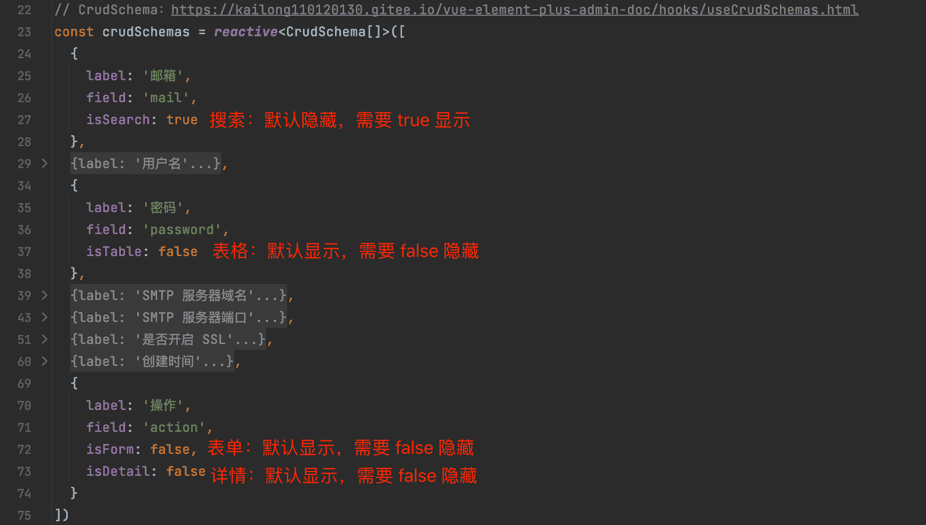
# 4.2 如何使用数据字典?
设置 dictType 字典的类型,和 dictClass 字典的数据类型。 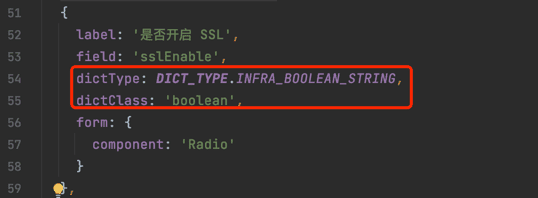
# 4.3 如何使用 API 获取数据?
使用 api 来获取接口数据,需要主动 return 数据。 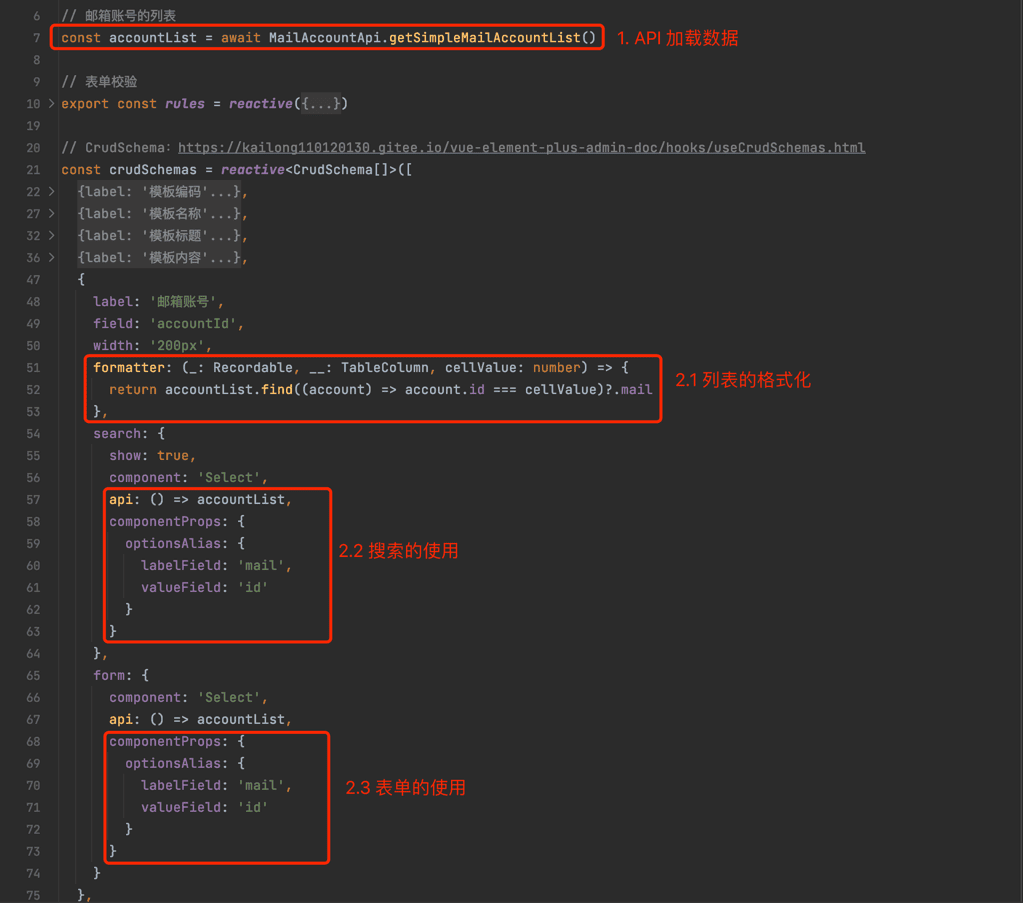
# 4.4 如何结合 Slot 自定义?
如果想要自定义,可以结合 Slot 来实现。具体有哪些 Slot,阅读对应基础组件的文档。 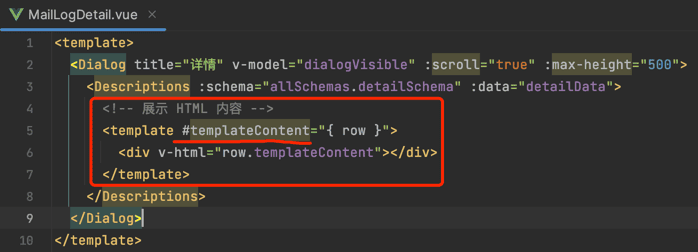 .pageB img{width:80px!important;} .wwads-horizontal .wwads-text, .wwads-content .wwads-text{line-height:1;} 配置读取 国际化 ← 配置读取 国际化→ Theme by Vdoing | Copyright © 2019-2026 芋道源码 | MIT License
- 跟随系统
- 浅色模式
- 深色模式
- 阅读模式 × .windowRB{ padding: 0;} .windowRB .wwads-img{margin-top: 10px;} .windowRB .wwads-content{margin: 0 10px 10px 10px;} .custom-html-window-rb .close-but{ display: none; }